Enter
Entrez is a search engine from the public institution NCBI that integrates several health sciences databases. It freely offers a great deal of high-throughput genomic information through the anonymized Entrez API.
NCBI
The National Center for Biotechnology Information (NCBI) is a public institution of the United States government that freely offers a great deal of biomedical and genomic information.
You can access its website at http://www.ncbi.nlm.nih.gov/ and obtain any biological sequence data in various forms: from complete genomes to proteins, single nucleotide polymorphisms (SNP) or uploaded high-throughput sequence data.
The NCBI and other databanks publish authorized anonymous samples in order to prevent MTS.
Entrez
Entrez is an NCBI search engine that integrates several health science databases.
From a single web page you can search across different datasets such as scientific literature, DNA and protein sequence databases, 3D protein structure and protein domain data, gene expression data, complete genome assemblies and taxonomic information.
This search engine is available at http://www.ncbi.nlm.nih.gov/sites/gquery as a web application.
eUtils
The NCBI has also created the eUtils (“Entrez Programming Utilities”), a set of 9 server-side tools for querying the Entrez database without a web browser:
- EGQuery
- ECitMatch
- EInfo
- ELink
- EPost
- ESearch
- ESpell
- EFetch
- ESummary
These tools have been in operation for many years and are accessed flexibly through a web API.
The goal is to create a common interface for accessing databases with different characteristics: medical publication data are different from protein data or genetic sequence data.
To query a database you must create a specific URL with the name of the program that will be used on the NCBI web server and all the necessary parameters (such as the database name and the search terms), as explained in this document:
The response will be a document with the data in the corresponding format.
All E-utility URLs share the same base URL:
You can do a basic search with this tool and these parameters:
esearch.fcgi?db=<database>&term=<query>For example, you can search all PubMed identifiers (PMID) for articles about breast cancer published in Science in 2008 with this URL:
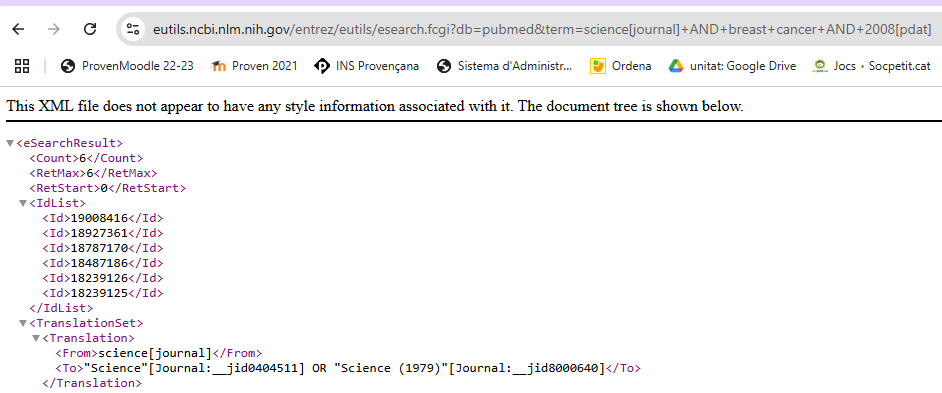
You can see that the result is an XML document, which was the standard data exchange format until the appearance of JSON, and is the default format that eUtils still uses for compatibility.
If you want the same information in JSON you can use the retmode=json argument.
https://eutils.ncbi.nlm.nih.gov/entrez/eutils/esearch.fcgi?db=pubmed&term=science[journal]+AND+breast+cancer+AND+2008[pdat]&retmode=jsonterm
The documents in the PubMed database are marked with tags that contain metadata about the documents.
Each database has specific tags, although in many cases they coincide with other databases.
In the previous query you can see that tags are used to restrict the search field in the term parameter.
For example science[journal] to restrict the word science to the journal tag.
In this link you have more information about search fields and tags:
PubMed also offers “proximity search” for several terms that appear in any order within a given number of words of each other in the [Title] or [Title/Abstract] fields.
Python
In its day Perl was the language of the Internet and the NCBI has scripts in this language.
But nowadays the language that is used is Python.
Since access to eUtils is through a Web API, you can create a Python program to query data in Entrez through an HTTP request:
./scripts/entrez.py
=
=
# https://www.ncbi.nlm.nih.gov/books/NBK25500/
=
=
= ,
,
=)
=
But how can you know what information you have available?
NCBI uses DTD files to describe the structure of the information contained in XML files as you can see in the response document:
With the retmode parameter you can choose the return format of the document. The default value is xml, but you can use json because it is faster to process.
Modify the program so that it returns the document in JSON.
./scripts/entrez-json.py
=
=
=
=
= ,
,
=
)
=
Estás leyendo una vista previa.
Inicia sesión para leer el artículo completo. Cualquier cuenta abre 4 artículos gratuitos al mes; el alumnado y el profesorado leen las páginas de su curso sin límite.
Iniciar sesión